
Cordium documentation · Latest
Concepts
This page explains the core resource types in Cordium, how they relate to each other, and the design principles behind them.
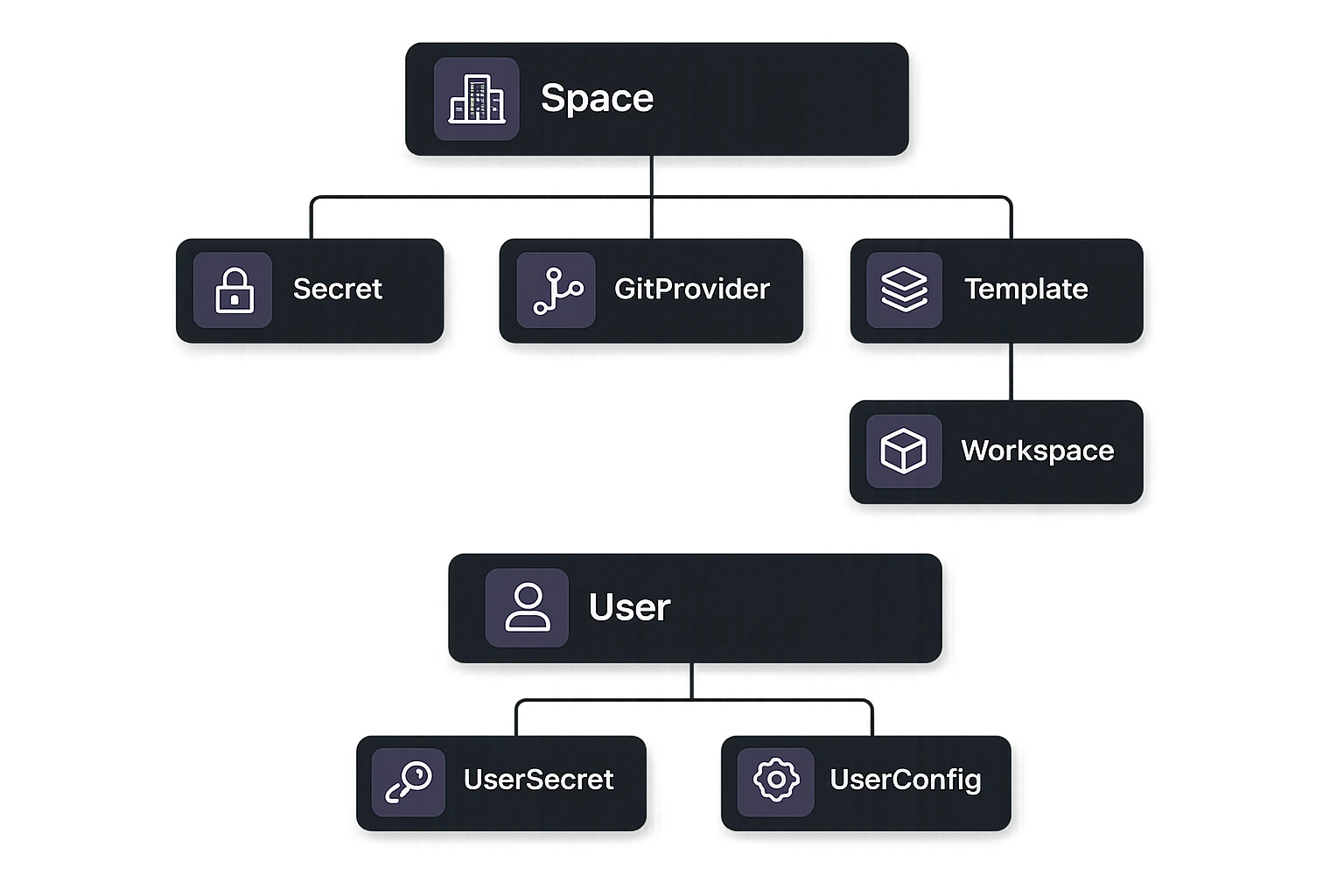
Spaces
A Space is the top-level namespace in Cordium. It groups Templates, Workspaces, Secrets, and GitProviders under a single organizational unit. Each User can own one or more Spaces. A default Space is created automatically on first Workspace creation. Additional Spaces can be created to separate projects or environments.
A Space can define runtime configuration (environment variables, lifecycle tasks) that cascades down to every Workspace within it regardless of Template. It can also define default and maximum resource limits: defaults apply when a Workspace or Template does not specify its own limits, and maximums are hard caps that no Workspace in the Space can exceed.
Memberships
A Membership connects an Octelium User to a Space and assigns a role: USER, ADMIN, or OWNER. The role determines which resources and settings the User can manage within that Space.
Workspaces
A Workspace (synonymous with sandbox) is the fundamental execution unit in Cordium. It is an isolated, rootless container-based environment that can be used interactively or programmatically via web-based console, cordium CLI, standard SSH, and gRPC-based APIs.
Workspaces are automatically assigned short randomly generated names (3 to 6 lowercase alphanumeric characters, e.g. abc, x7k2) by the Cordium Cluster. Every Workspace belongs to exactly one Template and one Space and is owned by an Octelium User. When a Workspace starts, Cordium creates a dedicated Octelium Session bound to that run. This Session is the Workspace's identity for secretless access to infrastructure via a running octelium process inside the Workspace. When the Workspace stops, the Session is deleted.
A persistent Workspace preserves its storage across stops and restarts. The filesystem resumes exactly where it left off. Only POST_START tasks re-run on subsequent starts. An ephemeral Workspace deletes its storage on stop. Every start provisions a fresh volume and runs the full initialization sequence from scratch. Ephemeral Workspaces are suited for AI agent tasks, disposable build environments, and any workload where state accumulation between runs is undesirable.
A Workspace is configured through its spec, which is merged from the Template spec, Space runtime config, UserConfig, and Cluster defaults at initialization time. A somewhat minimal Workspace configuration can look as follows:
Read in detail about Workspace configuration here.
You can use the YAML spec definitions with cordium run or cordium create workspace commands. You can also use inline flags (e.g. --image) to run Workspaces without using YAML files. Here are some examples:
Workspace state has a lifecycle that can be described as follows:
| State | Description |
STOPPED | The Workspace is not running. Storage is preserved if persistent. |
INIT_REQUEST | A start request has been accepted by the API server. |
INITIALIZING | Nocturne is provisioning the Kubernetes pod and waiting for the supervisor to become ready. |
PULLING_IMAGE | The container image is being pulled from the registry. |
BUILDING_IMAGE | The container image is being built from a Dockerfile or devcontainer spec. |
STARTING_RUNTIME | The Workspace container has started and the agent is initializing. |
PREPARING | The agent is running lifecycle setup: repository cloning, ON_CREATE tasks, dotfiles, devcontainer features. |
RUNNING | The Workspace is fully initialized and ready for use. |
STOPPING_REQUEST | A stop request has been received. |
STOPPING | The Workspace is shutting down gracefully, running PRE_STOP tasks. |
Failure at any stage is captured with a structured failure type (image pull failure, build failure, clone failure, task failure, health check failure, startup timeout) and is observable through the WatchWorkspace streaming RPC.
WorkspaceSnapshots
A WorkspaceSnapshot captures a Workspace's persistent storage so it can be restored into a new Workspace. Snapshot creation runs asynchronously while the source Workspace remains usable. Mounted Volumes are excluded from the snapshot.
Volumes
A Volume is persistent storage owned by a Space, with a lifecycle independent of the Workspaces that mount it. Volumes belong to a single Region and can be mounted by Workspaces in that Region. Exclusive Volumes support one active Workspace at a time; shared Volumes support concurrent mounts when the storage backend supports them.
Templates
A Template defines a reusable Workspace configuration within a Space. When a Workspace is created, it is initialized from the selected Template's spec. Every Space has a default Template created automatically. A Template's spec shares most of Workspace spec (image, runtime, etc.) as well as an optional GitProvider association.
Pre-Builds
A pre-build creates a Kubernetes VolumeSnapshot of a completed build Workspace. Subsequent Workspaces restore from this snapshot and start with all dependencies, compiled artifacts, and cloned repositories already in place. This can reduce startup time from minutes to seconds for dependency-heavy Templates.
Pre-building is triggered via cordium build <template> or the BuildTemplate API. A Template can have at most one active pre-build at a time.
Secrets
Secrets are sensitive values (API keys, tokens, passwords, certificates) stored within a Space. They are referenced by name in Template specs and are never embedded in configuration files or returned by the API after creation. The two primary use cases are environment variable injection and repository authentication. Here is an example inside Workspace configuration (read more here):
Configuration Merging
The effective Workspace configuration is assembled at initialization time by merging all configuration levels in precedence order:
Environment variables are merged across all levels. If the same key appears at multiple levels, the more specific level wins.
Lifecycle tasks are concatenated in order: Template tasks run first, then Space tasks, then UserConfig tasks. ON_CREATE tasks follow the same order but only execute on fresh runs.
Resource limits are resolved by precedence (Workspace > Template > Space default > Cluster default) and then capped by Space and Cluster maximums. For example, if a Workspace requests 16 CPU cores, a Space maximum of 8 cores is enforced as a hard cap.
Variable substitution is the final step: after the merged spec is assembled, ${{ vars.NAME }} patterns are resolved against the effective variable values and applied to all eligible string fields.
GitProviders
A GitProvider configures OAuth2 authentication against a git hosting service: GitHub, GitLab, or a generic OAuth2 provider. It can be attached to a Template via the gitProvider field. When a Workspace starts from that Template, the user's stored OAuth2 token is injected automatically, enabling git clone, git push, and other authenticated operations without any manual credential configuration. The git credential helper inside the Workspace handles token lookup transparently. Cordium also configures git config user.name and git config user.email from the provider's user profile.
User Configuration
UserConfig is a per-user configuration object applied across all of a user's Workspaces regardless of Space or Template. It is created automatically on first use.
It supports:
Dotfiles: A git repository URL. Cordium clones it into
~/dotfilesat the start of thePREPARINGphase and runs the first install script it finds (install.sh,bootstrap.sh,setup.sh, or equivalents).Environment variables: Static values or references to UserSecrets, injected into every Workspace.
tasks: Personal background services or tooling that should run in every Workspace, after Template-level and Workspace-level tasks.
UserSecrets
UserSecrets are per-user sensitive values, scoped to the owning User rather than a Space. They are used as value sources for UserConfig environment variables and for dotfile repository authentication.
UserSecrets support an SSH_KEY type that generates a server-side ECDSA key pair. The private key is stored and automatically loaded into an SSH agent (octelium-ssh-agent) inside every Workspace.
Regions
A Region represents an Octelium Region enabled to host Cordium Workspaces. Cordium exposes its country and city so clients can select where a Workspace runs.
Relationship to Octelium
Every resource in Cordium is grounded in Octelium's identity and resource system.
Users are Octelium Users authenticated through Octelium's identity providers (OIDC, SAML, GitHub OAuth2, workload OIDC assertions). You can read more about Users here.
Sessions are Octelium Sessions. Every Workspace run creates a dedicated Session. The Session is the credential used by octelium connect for secretless infrastructure access and is destroyed when the Workspace stops. You can read more about Sessions here.
Service each protected resource (e.g. remote internal resource, publicly protected SaaS resource, IoT, etc.) in the Octelium Cluster is represented and implemented by a Service. Users can access their authorized Services in a secretless way without having to share credentials inside. You can read more about Services here.